AutoLog-AI-FirstCRMHCPModule
AutoLog is an innovative Customer Relationship Management (CRM) module designed specifically for the pharmaceutical sales industry. It transforms the traditional, time-consuming process of logging interactions with Healthcare Professionals (HCPs) into a seamless, AI-powered experience. By leveraging advanced natural language processing, AutoLog enables sales representatives to interact with their CRM through a conversational interface, ensuring that data is captured accurately and efficiently.
#How it works
The core of AutoLog is its intelligent form panel that interacts directly with the HCP. Representatives can engage in natural conversation, detailing their interactions, discussions, and outcomes. The system automatically processes this input, extracts relevant information, and populates the corresponding CRM fields in real time. This "AI-first" approach eliminates the need for manual data entry, allowing representatives to focus on building relationships rather than managing data.
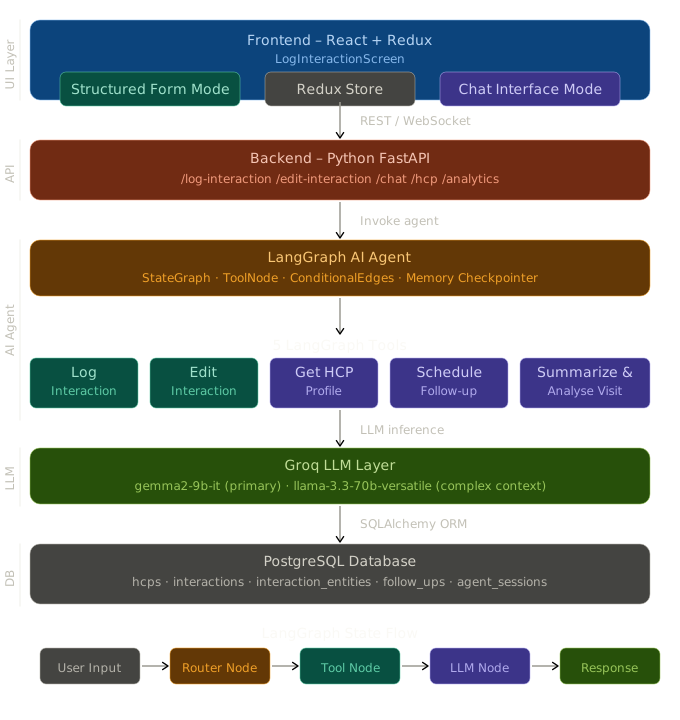
The architecture is built around a robust backend powered by FastAPI and Python, ensuring high performance and scalability. The frontend, developed with React and TypeScript, provides a modern, responsive interface that integrates smoothly with existing CRM systems. Langgraph handles the agentic workflow of processing the conversation and extracting relevant information. The entire workflow is orchestrated through a modular design that prioritizes reliability and user experience.
#Key Features
Core Functionality
- AI-Powered Form Filling - Real-time population of CRM fields through natural language conversations with HCPs.
- Conversational Interface - Intuitive, chat-like interaction model that mimics natural human conversation.
- Real-Time Updates - Instant synchronization of data across the entire system, ensuring consistency.
- User-Friendly UI - Clean, modern interface that reduces cognitive load on sales representatives.
Frontend
- React - Component-based UI development
- Redux Toolkit - Predictable state management
- Axios - Promise-based HTTP client
- Tailwind CSS - Utility-first styling
- Google Inter - Modern web typography
- Vite - Next-generation front-end tooling
Backend
- FastAPI - High-performance web framework
- SQLAlchemy - Database ORM
- Alembic - Database migrations
- LangGraph - AI agent framework
- LangChain - LLM integration (Groq)
- Groq - Ultra-fast inference for
llama-3.1-8bandllama-3.3-70b - PostgreSQL - Relational database
- Docker Compose - Container orchestration
#LangGraph Agent Design
The agent is built as a StateGraph with three nodes:
AgentState
class AgentState(TypedDict):messages: Annotated[List[BaseMessage], operator.add]session_id: strhcp_id: Optional[str]interaction_draft: InteractionDraft # This is what populates the formlast_tool_called: Optional[str]interaction_id: Optional[str]error: Optional[str]final_response: Optional[str]
Graph Flow
Entry ──► [LLM Node] ──has tool call?──► YES ──► [Tool Node] ──► [LLM Node]│ │NO │▼ ▼[END] [END]
The interaction_draft field in AgentState is the key to the split-screen UX — every tool updates this dict, and the FastAPI response returns it to the frontend, which dispatches it to Redux, which re-renders FormPanel.
#LangGraph Tools
log_interaction- Trigger phrase examples: "Met Dr. X today", "Just finished a call with..."
- LLM used:
llama-3.1-8b-instant
edit_interaction- Trigger phrase examples: "Change sentiment to positive", "Add Metformin to products"
- LLM used:
llama-3.1-8b-instant
get_hcp_profile- Trigger phrase examples: "Tell me about Dr. X", "Profile before my visit"
- LLM used:
llama-3.1-8b-instant
schedule_follow_up- Trigger phrase examples: "Follow up in 10 days", "Schedule sample delivery"
- LLM used:
llama-3.3-70b-versatile
summarize_and_analyze_visit- Trigger phrase examples: "Analyze my visits", "How is my engagement with Dr. X?"
- LLM used:
llama-3.3-70b-versatile
Tool 1 — log_interaction (detailed)
Takes raw chat input and:
- Calls
llama-3.1-8b-instantto extract structured entities:json{"drugs_mentioned": ["Rosuvastatin", "Atorvastatin"],"objections": ["pricing concern"],"competitors": [],"action_items": ["send samples"]} - Generates an
ai_summary(2–3 sentences) - Writes to
interactionstable - Returns the full
interaction_draftto update the form
Tool 2 — edit_interaction (detailed)
Accepts a natural language edit instruction:
- Fetches the current interaction record from DB
- Sends instruction + current record to LLM: "Return only the JSON fields that need to change"
- Applies the JSON delta via SQL UPDATE
- Returns the updated
interaction_draft
#Key Design Decisions
Why chat-only form updates?
The assignment specifies the form and chat are side-by-side, and the form must be updated exclusively through the chat agent. This mirrors real field rep workflows — reps dictate or type naturally, and the AI structures the data. It also demonstrates the LangGraph agent's ability to extract structured data from unstructured text and maintain state across turns.
Why LangGraph over plain LangChain?
LangGraph provides a StateGraph that persists the interaction_draft across multiple tool calls in a single session. If a rep says "log my visit" and then "now schedule a follow-up", LangGraph carries the interaction_id from the first tool into the second — no re-prompting needed. Plain LangChain agent would lose this context.
Why two Groq models?
llama-3.1-8b-instant is fast and accurate for structured extraction tasks (entity extraction, JSON generation). llama-3.3-70b-versatile is used for tasks requiring richer reasoning — multi-visit trend analysis and intelligent follow-up date suggestion — where the larger context window and reasoning capability matter.
Why PostgreSQL over MySQL?
PostgreSQL's native JSONB type is used for products_discussed, entities_json, and messages_json. JSONB enables efficient querying of nested fields (e.g., WHERE entities_json->>'sentiment' = 'positive') without a schema change when the entity extraction output evolves.
#Model Used
- Groq llama-3.1-8b-instant
- Version: 0.1
- Use Case: Entity extraction, JSON generation
- Groq llama-3.3-70b-versatile
- Version: 0.1
- Use Case: Multi-visit trend analysis, follow-up date suggestion